[root@ocs ~]# cd /opt/
[root@ocs ~]# git clone https://github.com/OCSInventory-NG/OCSInventory-Server.git
[root@ocs opt]# git clone https://github.com/OCSInventory-NG/OCSInventory-ocsreports.git ocsreports
[root@ocs opt]# cd OCSInventory-Server/
[root@ocs OCSInventory-Server]# sh setup.sh

+----------------------------------------------------------+

  Welcome to OCS Inventory NG Management server setup !

+----------------------------------------------------------+

Trying to determine which OS or Linux distribution you use
+----------------------------------------------------------+
 Checking for Apache web server binaries !
+----------------------------------------------------------+

CAUTION: If upgrading Communication server from OCS Inventory NG 1. 0 RC2 and
previous, please remove any Apache configuration for Communication Server!

Do you wish to continue ( [y]/n )?
Assuming Communication server 1. 0 RC2 or previous is not installed
on this computer.

Starting OCS Inventory NG Management server setup from folder /opt/OCSInventory-Server
Storing log in file /opt/OCSInventory-Server/ocs_server_setup.log

+----------------------------------------------------------+
 Checking for database server properties...
+----------------------------------------------------------+

Your MySQL client seems to be part of MySQL version 10. 5.
Your computer seems to be running MySQL 4. 1 or higher, good ;- )

Which host is running database server [localhost] ?
OK, database server is running on host localhost ;- )

On which port is running database server [3306] ?
OK, database server is running on port 3306 ;- )


+----------------------------------------------------------+
 Checking for Apache web server daemon...
+----------------------------------------------------------+

Where is Apache daemon binary [/usr/sbin/httpd] ?
OK, using Apache daemon /usr/sbin/httpd ;- )


+----------------------------------------------------------+
 Checking for Apache main configuration file...
+----------------------------------------------------------+

ocsinventory-server: Bad setting. `IPDISCOVER_LINK_TAG_NETWORK` is not set. Default: `0`
ocsinventory-server: Can't load SOAP::Transport::HTTP* - Web service will be unavailable
AH00558: httpd: Could not reliably determine the server's fully qualified domain name, using fe80::21b:fe6b:acba:a137. Set the 'ServerName' directive globally to suppress this message
ocsinventory-server: Bad setting. `IPDISCOVER_LINK_TAG_NETWORK` is not set. Default: `0`
ocsinventory-server: Can't load SOAP::Transport::HTTP* - Web service will be unavailable
AH00558: httpd: Could not reliably determine the server's fully qualified domain name, using fe80::21b:fe6b:acba:a137. Set the 'ServerName' directive globally to suppress this message
Where is Apache main configuration file [/etc/httpd/conf/httpd.conf] ?
OK, using Apache main configuration file /etc/httpd/conf/httpd.conf ;- )


+----------------------------------------------------------+
 Checking for Apache user account...
+----------------------------------------------------------+

Which user account is running Apache web server [apache] ?
OK, Apache is running under user account apache ;- )


+----------------------------------------------------------+
 Checking for Apache group...
+----------------------------------------------------------+

Which user group is running Apache web server [apache] ?
OK, Apache is running under users group apache ;- )


+----------------------------------------------------------+
 Checking for Apache Include configuration directory...
+----------------------------------------------------------+

Setup found Apache Include configuration directory in
/etc/httpd/conf.d.
Setup will put OCS Inventory NG Apache configuration in this directory.
Where is Apache Include configuration directory [/etc/httpd/conf.d] ?
OK, Apache Include configuration directory /etc/httpd/conf.d found ;- )


+----------------------------------------------------------+
 Checking for PERL Interpreter...
+----------------------------------------------------------+

Found PERL interpreter at </usr/bin/perl> ;- )
Where is PERL interpreter binary [/usr/bin/perl] ?
OK, using PERL interpreter /usr/bin/perl ;- )


Do you wish to setup Communication server on this computer ( [y]/n )?


+----------------------------------------------------------+
             Checking for Make utility...
+----------------------------------------------------------+

OK, Make utility found at </usr/bin/make> ;- )

+----------------------------------------------------------+
        Checking for Apache mod_perl version...
+----------------------------------------------------------+

Checking for Apache mod_perl version 1. 99_22 or higher
Found that mod_perl version 1. 99_22 or higher is available.
OK, Apache is using mod_perl version 1. 99_22 or higher ;- )

+----------------------------------------------------------+
    Checking for Communication server log directory...
+----------------------------------------------------------+

Communication server can create detailed logs. This logs can be enabled
by setting integer value of LOGLEVEL to 1 in Administration console
menu Configuration.
Where to put Communication server log directory [/var/log/ocsinventory-server] ?
OK, Communication server will put logs into directory /var/log/ocsinventory-server ;- )

+----------------------------------------------------------------------------+
    Checking for Communication server plugins configuration directory...
+----------------------------------------------------------------------------+

Communication server need a directory for plugins configuration files.
Where to put Communication server plugins configuration files [/etc/ocsinventory-server/plugins] ?
OK, Communication server will put plugins configuration files into directory /etc/ocsinventory-server/plugins ;- )

+-------------------------------------------------------------------+
   Checking for Communication server plugins perl directory...
+-------------------------------------------------------------------+

Communication server need a directory for plugins Perl modules files.
Where to put Communication server plugins Perl modules files [/etc/ocsinventory-server/perl] ?
OK, Communication server will put plugins Perl modules files into directory /etc/ocsinventory-server/perl ;- )


+----------------------------------------------------------+
 Checking for required Perl Modules...
+----------------------------------------------------------+

Checking for DBI PERL module...
Found that PERL module DBI is available.
Checking for Apache::DBI PERL module...
Found that PERL module Apache::DBI is available.
Checking for DBD::mysql PERL module...
Found that PERL module DBD::mysql is available.
Checking for Compress::Zlib PERL module...
Found that PERL module Compress::Zlib is available.
Checking for XML::Simple PERL module...
Found that PERL module XML::Simple is available.
Checking for Net::IP PERL module...
Found that PERL module Net::IP is available.
Checking for Archive::Zip Perl module...
Found that PERL module Archive::Zip is available.


Do you wish to setup Rest API server on this computer ( [y]/n )?

+----------------------------------------------------------+
 Checking for REST API Dependencies ...
+----------------------------------------------------------+

Found that PERL module Mojolicious::Lite is available.
Found that PERL module Switch is available.
Found that PERL module Plack::Handler is available.

+----------------------------------------------------------+
 Configuring REST API Server files ...
+----------------------------------------------------------+

Where do you want the API code to be store [/usr/lib64/perl5/vendor_perl] ?
Copying files to /usr/lib64/perl5/vendor_perl

+----------------------------------------------------------+
 Configuring REST API Server configuration files ...
+----------------------------------------------------------+


+----------------------------------------------------------+
                 OK, looks good ;- )

     Configuring Communication server Perl modules...
+----------------------------------------------------------+

Writing Makefile for Apache::Ocsinventory

+----------------------------------------------------------+
                 OK, looks good ;- )

      Preparing Communication server Perl modules...
+----------------------------------------------------------+


+----------------------------------------------------------+
                 OK, prepare finshed ;- )

     Installing Communication server Perl modules...
+----------------------------------------------------------+


+----------------------------------------------------------+
 OK, Communication server Perl modules install finished;- )

     Creating Communication server log directory...
+----------------------------------------------------------+

Creating Communication server log directory /var/log/ocsinventory-server.

Fixing Communication server log directory files permissions.
Configuring logrotate for Communication server.
Removing old communication server logrotate file /etc/logrotate.d/ocsinventory-NG
Writing communication server logrotate to file /etc/logrotate.d/ocsinventory-server


+----------------------------------------------------------------------+
        OK, Communication server log directory created ;- )

   Creating Communication server plugins configuration directory...
+----------------------------------------------------------------------+

Creating Communication server plugins configuration directory /etc/ocsinventory-server/plugins.


+----------------------------------------------------------------------+
 OK, Communication server plugins configuration directory created ;- )

        Creating Communication server plugins Perl directory...
+----------------------------------------------------------------------+

Creating Communication server plugins Perl directory /etc/ocsinventory-server/perl.


+----------------------------------------------------------------------+
     OK, Communication server plugins Perl directory created ;- )

               Now configuring Apache web server...
+----------------------------------------------------------------------+

To ensure Apache loads mod_perl before OCS Inventory NG Communication Server,
Setup can name Communication Server Apache configuration file
'z-ocsinventory-server.conf' instead of 'ocsinventory-server.conf'.
Do you allow Setup renaming Communication Server Apache configuration file
to 'z-ocsinventory-server.conf' ( [y]/n ) ?
OK, using 'z-ocsinventory-server.conf' as Communication Server Apache configuration file
Removing old communication server configuration to file /etc/httpd/conf.d/ocsinventory.conf
Writing communication server configuration to file /etc/httpd/conf.d/z-ocsinventory-server.conf

+----------------------------------------------------------------------+
       OK, Communication server setup successfully finished ;- )

 Please, review /etc/httpd/conf.d/z-ocsinventory-server.conf
         to ensure all is good. Then restart Apache daemon.
+----------------------------------------------------------------------+


Do you wish to setup Administration Server ( Web Administration Console )
on this computer ( [y]/n )?

+----------------------------------------------------------+
    Checking for Administration Server directories...
+----------------------------------------------------------+

CAUTION: Setup now install files in accordance with Filesystem Hierarchy
Standard. So, no file is installed under Apache root document directory
( Refer to Apache configuration files to locate it ).
If you're upgrading from OCS Inventory NG Server 1. 01 and previous, YOU
MUST REMOVE ( or move ) directories 'ocsreports' and 'download' from Apache
root document directory.
If you choose to move directory, YOU MUST MOVE 'download' directory to
Administration Server writable/cache directory ( by default
/var/lib/ocsinventory-reports ), especially if you use deployment feature.

Do you wish to continue ( [y]/n )?
Assuming directories 'ocsreports' and 'download' removed from
Apache root document directory.

Where to copy Administration Server static files for PHP Web Console
[/usr/share/ocsinventory-reports] ?
OK, using directory /usr/share/ocsinventory-reports to install static files ;- )

Where to create writable/cache directories for deployment packages,
administration console logs, IPDiscover and SNMP [/var/lib/ocsinventory-reports] ?
OK, writable/cache directory is /var/lib/ocsinventory-reports ;- )


+----------------------------------------------------------+
         Checking for required Perl Modules...
+----------------------------------------------------------+

Checking for DBI PERL module...
Found that PERL module DBI is available.
Checking for DBD::mysql PERL module...
Found that PERL module DBD::mysql is available.
Checking for XML::Simple PERL module...
Found that PERL module XML::Simple is available.
Checking for Net::IP PERL module...
Found that PERL module Net::IP is available.

+----------------------------------------------------------+
      Installing files for Administration server...
+----------------------------------------------------------+

Creating PHP directory /usr/share/ocsinventory-reports/ocsreports.
Copying PHP files to /usr/share/ocsinventory-reports/ocsreports.
Fixing permissions on directory /usr/share/ocsinventory-reports/ocsreports.
Creating database configuration file /usr/share/ocsinventory-reports/ocsreports/dbconfig.inc.php.
Creating IPDiscover directory /var/lib/ocsinventory-reports/ipd.
Fixing permissions on directory /var/lib/ocsinventory-reports/ipd.
Creating packages directory /var/lib/ocsinventory-reports/download.
Fixing permissions on directory /var/lib/ocsinventory-reports/download.
Creating snmp mibs directory /var/lib/ocsinventory-reports/snmp.
Fixing permissions on directory /var/lib/ocsinventory-reports/snmp.
Creating Administration server log files directory /var/lib/ocsinventory-reports/logs.
Fixing permissions on directory /var/lib/ocsinventory-reports/logs.
Creating Administration server scripts log files directory /var/lib/ocsinventory-reports/scripts.
Fixing permissions on directory /var/lib/ocsinventory-reports/scripts.
Configuring IPDISCOVER-UTIL Perl script.
Installing IPDISCOVER-UTIL Perl script.
Fixing permissions on IPDISCOVER-UTIL Perl script.
Writing Administration server configuration to file /etc/httpd/conf.d/ocsinventory-reports.conf

+----------------------------------------------------------------------+
        OK, Administration server installation finished ;- )

 Please, review /etc/httpd/conf.d/ocsinventory-reports.conf
          to ensure all is good and restart Apache daemon.

 Then, point your browser to http://server//ocsreports
        to configure database server and create/update schema.
+----------------------------------------------------------------------+


Setup has created a log file /opt/OCSInventory-Server/ocs_server_setup.log. Please, save this file.
If you encounter error while running OCS Inventory NG Management server,
we can ask you to show us its content !

DON'T FORGET TO RESTART APACHE DAEMON !

Enjoy OCS Inventory NG ;- )

[root@ocs OCSInventory-Server]# systemctl restart httpd
|


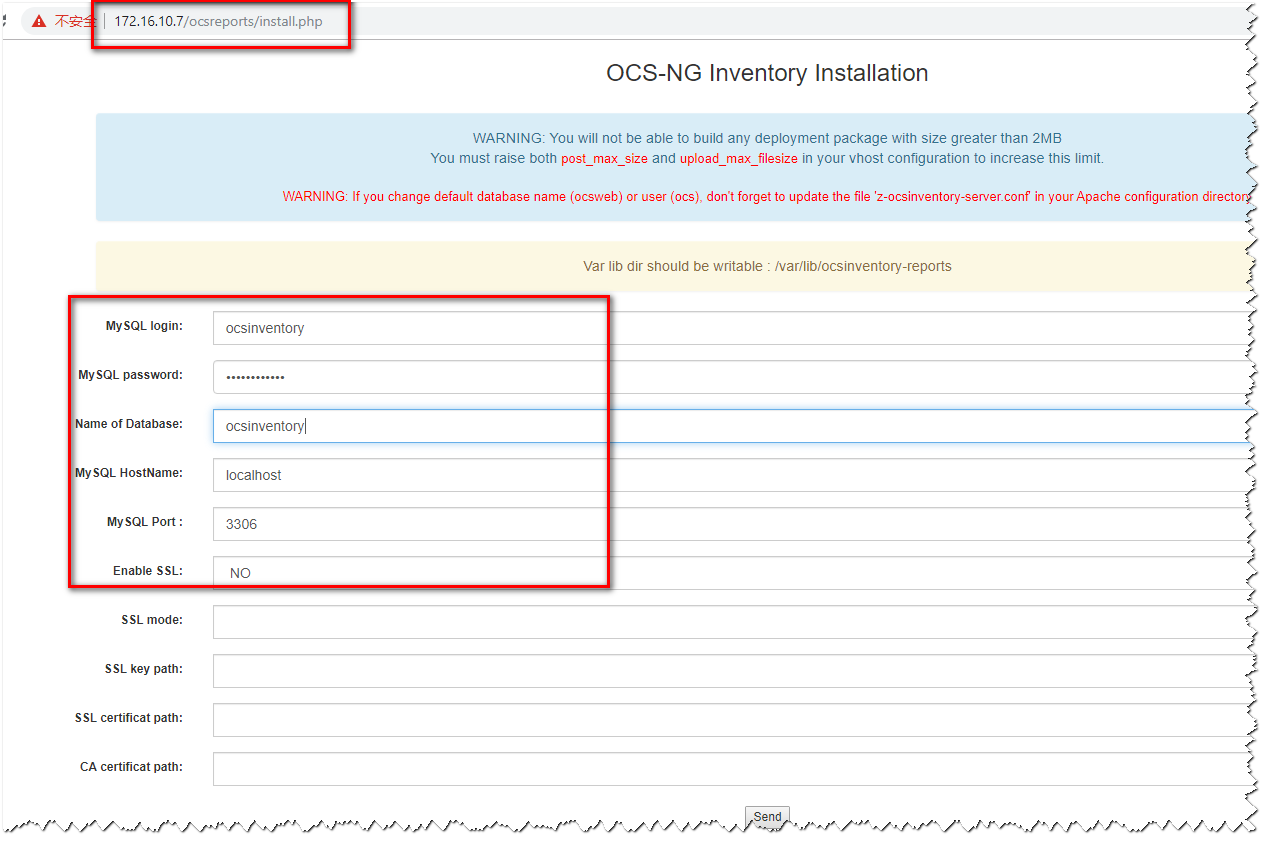 确认其他配置文件,注意红框内信息
 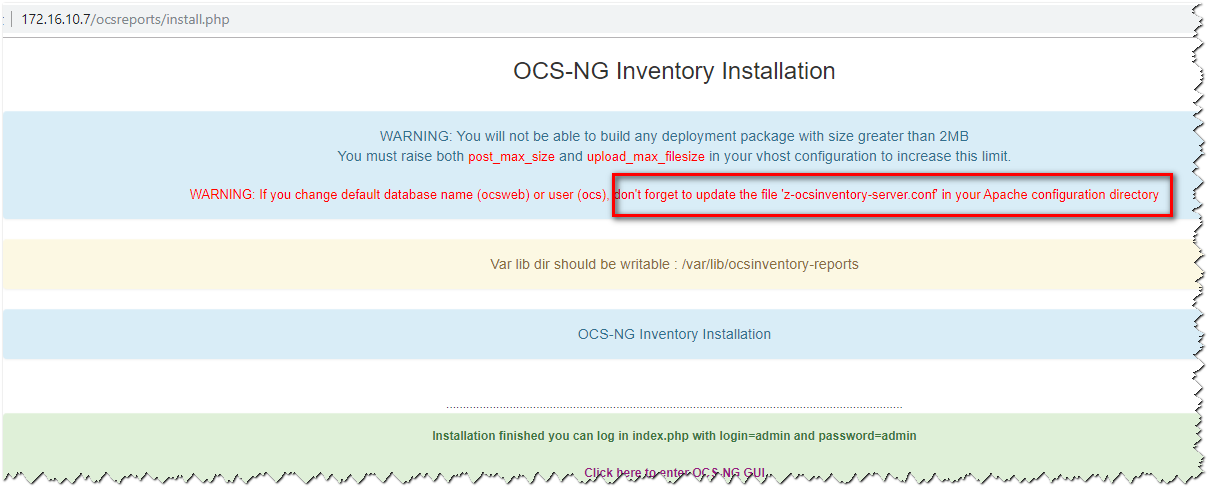 完成配置
完成配置 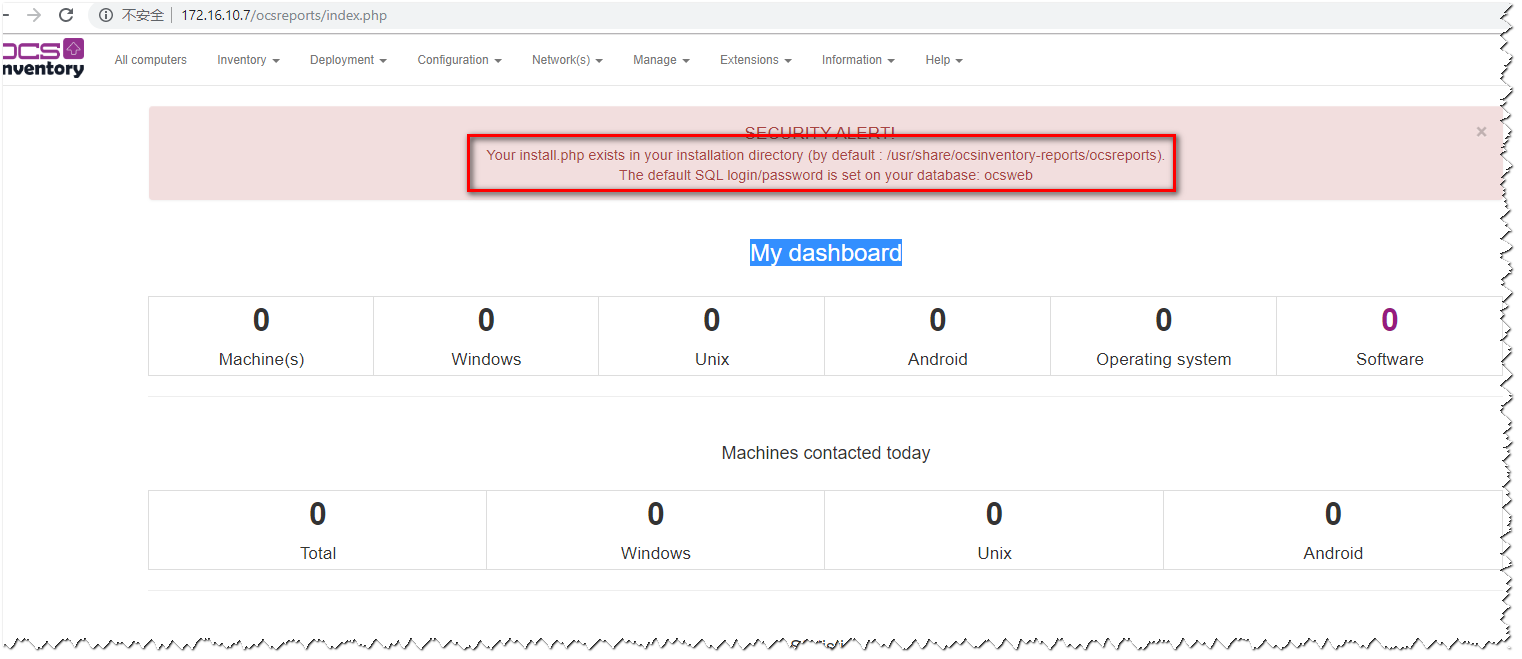
 微信
微信