# 默认视图
<Huawei>
# 进入系统视图
<Huawei>system-view
Enter system view, return user view with Ctrl+Z.
[Huawei]
# 关闭信息中心
[Huawei]undo info-center enable
Info: Information center is disabled.
# 更改设备名称
[Huawei]sysname SW-1
# 显示当前配置
[SW-1]display current-configuration
#
sysname SW-1
#
undo info-center enable
#
cluster enable
ntdp enable
ndp enable
# 查看VLAN信息
[SW-1]display vlan
The total number of vlans is : 1
--------------------------------------------------------------------------------
U: Up;         D: Down;         TG: Tagged;         UT: Untagged;
MP: Vlan-mapping;               ST: Vlan-stacking;
#: ProtocolTransparent-vlan;    *: Management-vlan;
--------------------------------------------------------------------------------

VID  Type    Ports
--------------------------------------------------------------------------------
1    common  UT:Eth0/0/1( D )     Eth0/0/2( D )     Eth0/0/3( D )     Eth0/0/4( D )
                Eth0/0/5( D )     Eth0/0/6( D )     Eth0/0/7( D )     Eth0/0/8( D )
                Eth0/0/9( D )     Eth0/0/10( D )    Eth0/0/11( D )    Eth0/0/12( D )
                Eth0/0/13( D )    Eth0/0/14( D )    Eth0/0/15( D )    Eth0/0/16( D )
                Eth0/0/17( D )    Eth0/0/18( D )    Eth0/0/19( D )    Eth0/0/20( D )
                Eth0/0/21( D )    Eth0/0/22( D )    GE0/0/1( D )      GE0/0/2( D )

VID  Status  Property      MAC-LRN Statistics Description
--------------------------------------------------------------------------------
1    enable  default       enable  disable    VLAN 0001
# 查看接口信息
[SW-1]display interface Ethernet 0/0/1
Ethernet0/0/1 current state : DOWN
Line protocol current state : DOWN
Description:
Switch Port, PVID :    1, TPID : 8100( Hex ), The Maximum Frame Length is 9216
IP Sending Frames' Format is PKTFMT_ETHNT_2, Hardware address is 4c1f-cca6-5838
Last physical up time   : -
Last physical down time : 2025-03-03 17:29:10 UTC-08:00
Current system time: 2025-03-03 17:35:14-08:00
Hardware address is 4c1f-cca6-5838
    Last 300 seconds input rate 0 bytes/sec, 0 packets/sec
    Last 300 seconds output rate 0 bytes/sec, 0 packets/sec
    Input: 0 bytes, 0 packets
    Output: 0 bytes, 0 packets
    Input:
      Unicast: 0 packets, Multicast: 0 packets
      Broadcast: 0 packets
    Output:
      Unicast: 0 packets, Multicast: 0 packets
      Broadcast: 0 packets
    Input bandwidth utilization  :    0%
    Output bandwidth utilization :    0%
# 查看接口配置,进入e0/0/1接口并显示
[SW-1]interface Ethernet 0/0/1
[SW-1-Ethernet0/0/1]display this
#
interface Ethernet0/0/1
#
return
# 退出接口视图
[SW-1-Ethernet0/0/1]quit
# 退出系统视图
[SW-1]quit
# 保存当前配置
<SW-1>save
The current configuration will be written to the device.
Are you sure to continue?[Y/N]y
Info: Please input the file name ( *. cfg, *. zip  ) [vrpcfg.zip]:
Now saving the current configuration to the slot 0.
Save the configuration successfully.
# 重启交换机
<SW-1>reboot
Info: The system is now comparing the configuration, please wait.
Info: If want to reboot with saving diagnostic information, input 'N' and then execute 'reboot save diagnostic-information'.
System will reboot! Continue?[Y/N]:Y
# 重置交换机
<SW-1>reset saved-configuration
Warning: The action will delete the saved configuration in the device.
The configuration will be erased to reconfigure. Continue? [Y/N]:Y
Warning: Now clearing the configuration in the device.
Info: Succeeded in clearing the configuration in the device.
# 重启交换机方可生效,不再保存配置
<SW-1>reboot
Info: The system is now comparing the configuration, please wait.
Warning: All the configuration will be saved to the configuration file for the next startup:, Continue?[Y/N]:n
Info: If want to reboot with saving diagnostic information, input 'N' and then execute 'reboot save diagnostic-information'.
System will reboot! Continue?[Y/N]:y
<SW-1>
<Huawei>
interface Ethernet0/0/1 undo negotiation auto duplex full speed 100 flow-control display this description To_PC1 quit
interface Ethernet0/0/2 undo negotiation auto duplex full speed 100 flow-control display this description To_PC2 quit
interface Ethernet0/0/3 undo negotiation auto duplex full speed 100 flow-control display this description To_PC3 quit
interface Ethernet0/0/4 undo negotiation auto duplex full speed 100 flow-control display this description To_PC4 quit # 显示当前VLAN,可以看到初始默认VLAN ID为1 [SW-1]display vlan The total number of vlans is : 1 -------------------------------------------------------------------------------- U: Up; D: Down; TG: Tagged; UT: Untagged; MP: Vlan-mapping; ST: Vlan-stacking; #: ProtocolTransparent-vlan; *: Management-vlan; --------------------------------------------------------------------------------
VID Type Ports -------------------------------------------------------------------------------- 1 common UT:Eth0/0/1( U ) Eth0/0/2( U ) Eth0/0/3( D ) Eth0/0/4( D ) Eth0/0/5( U ) Eth0/0/6( U ) Eth0/0/7( D ) Eth0/0/8( D ) Eth0/0/9( D ) Eth0/0/10( D ) Eth0/0/11( D ) Eth0/0/12( D ) Eth0/0/13( D ) Eth0/0/14( D ) Eth0/0/15( D ) Eth0/0/16( D ) Eth0/0/17( D ) Eth0/0/18( D ) Eth0/0/19( D ) Eth0/0/20( D ) Eth0/0/21( D ) Eth0/0/22( D ) GE0/0/1( D ) GE0/0/2( D )
VID Status Property MAC-LRN Statistics Description -------------------------------------------------------------------------------- 1 enable default enable disable VLAN 0001 # 查看默认接口所属VLAN信息,可见初始状态下接口PVID为1,所有接口默认属于VLAN1,接口类型为Hybrid [SW-1]display port vlan Port Link Type PVID Trunk VLAN List ------------------------------------------------------------------------------- Ethernet0/0/1 hybrid 1 - Ethernet0/0/2 hybrid 1 - Ethernet0/0/3 hybrid 1 - Ethernet0/0/4 hybrid 1 - Ethernet0/0/5 hybrid 1 - Ethernet0/0/6 hybrid 1 - Ethernet0/0/7 hybrid 1 - Ethernet0/0/8 hybrid 1 - Ethernet0/0/9 hybrid 1 - Ethernet0/0/10 hybrid 1 - Ethernet0/0/11 hybrid 1 - Ethernet0/0/12 hybrid 1 - GigabitEthernet0/0/1 hybrid 1 - GigabitEthernet0/0/2 hybrid 1 - # 创建VLAN 10 20 [SW-1]vlan 10 [SW-1-vlan10]quit [SW-1]vlan 20 [SW-1-vlan20]quit # 将接口划入VLAN,依次按设计表格执行 [SW-1]interface Eth0/0/1 [SW-1-Ethernet0/0/1]port link-type access [SW-1-Ethernet0/0/1]port default vlan 10 [SW-1-Ethernet0/0/1]quit [SW-1] # 查看划分完成之后的vlan信息 [SW-1]display vlan The total number of vlans is : 3 -------------------------------------------------------------------------------- VID Status Property MAC-LRN Statistics Description -------------------------------------------------------------------------------- 1 enable default enable disable VLAN 0001 10 enable default enable disable VLAN 0010 20 enable default enable disable VLAN 0020 # 查看端口所属VLAN [SW-1]display port vlan Port Link Type PVID Trunk VLAN List ------------------------------------------------------------------------------- Ethernet0/0/1 access 10 - Ethernet0/0/2 access 10 - Ethernet0/0/3 hybrid 1 - Ethernet0/0/4 hybrid 1 - Ethernet0/0/5 access 20 - Ethernet0/0/6 access 20 -
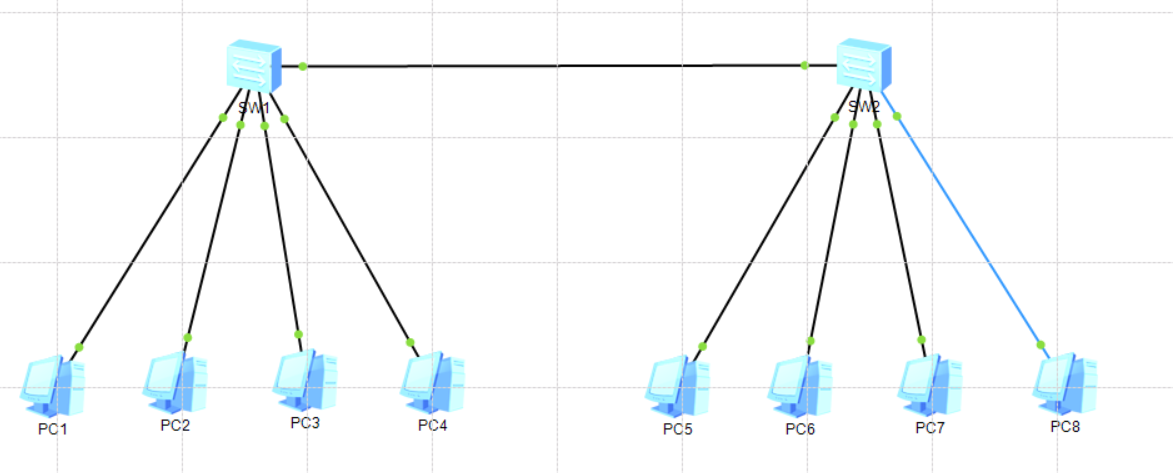
跨交换机VLAN
交换机规划
序号
设备名称
接口
VLAN ID
对接设备/端口
1
SW-1
Ethernet 0/0/1
10
PC1
2
SW-1
Ethernet 0/0/2
10
PC2
3
SW-1
Ethernet 0/0/5
20
PC3
4
SW-1
Ethernet 0/0/6
20
PC4
5
SW-2
Ethernet 0/0/1
10
PC1
6
SW-2
Ethernet 0/0/2
10
PC2
7
SW-2
Ethernet 0/0/5
20
PC3
8
SW-2
Ethernet 0/0/6
20
PC4
9
SW-1
GE 0/0/1
1、10、20
SW-2
10
SW-2
GE 0/0/1
1、10、20
SW-1
主机IP地址规划表
序号
设备
IP地址/子网掩码
VLAN ID
接入交换机
1
PC1
192. 168. 24. 11/24
10
SW-1 0/0/1
2
PC2
192. 168. 24. 12/24
10
SW-1 0/0/2
3
PC3
192. 168. 24. 21/24
20
SW-1 0/0/5
4
PC4
192. 168. 24. 22/24
20
SW-1 0/0/6
5
PC1
192. 168. 24. 13/24
10
SW-2 0/0/1
6
PC2
192. 168. 24. 14/24
10
SW-2 0/0/2
7
PC3
192. 168. 24. 23/24
20
SW-2 0/0/5
8
PC4
192. 168. 24. 24/24
20
SW-2 0/0/6
# 初始化第二台交换机并创建VLAN
[SW-2]display vlan
The total number of vlans is : 3
--------------------------------------------------------------------------------
VID  Status  Property      MAC-LRN Statistics Description
--------------------------------------------------------------------------------
1    enable  default       enable  disable    VLAN 0001
10   enable  default       enable  disable    VLAN 0010
20   enable  default       enable  disable    VLAN 0020
# 配置上联接口
[SW-2]interface GigabitEthernet 0/0/1
[SW-2-GigabitEthernet0/0/1]port link-type trunk
[SW-2-GigabitEthernet0/0/1]port trunk allow-pass vlan 10 20
[SW-2-GigabitEthernet0/0/1]quit

# 显示端口VLAN归属
[SW-2]display port vlan
Port                    Link Type    PVID  Trunk VLAN List
-------------------------------------------------------------------------------
Ethernet0/0/1           access       10    -
Ethernet0/0/2           access       10    -

Ethernet0/0/5           access       20    -
Ethernet0/0/6           access       20    -

GigabitEthernet0/0/1    trunk        1     1 10 20
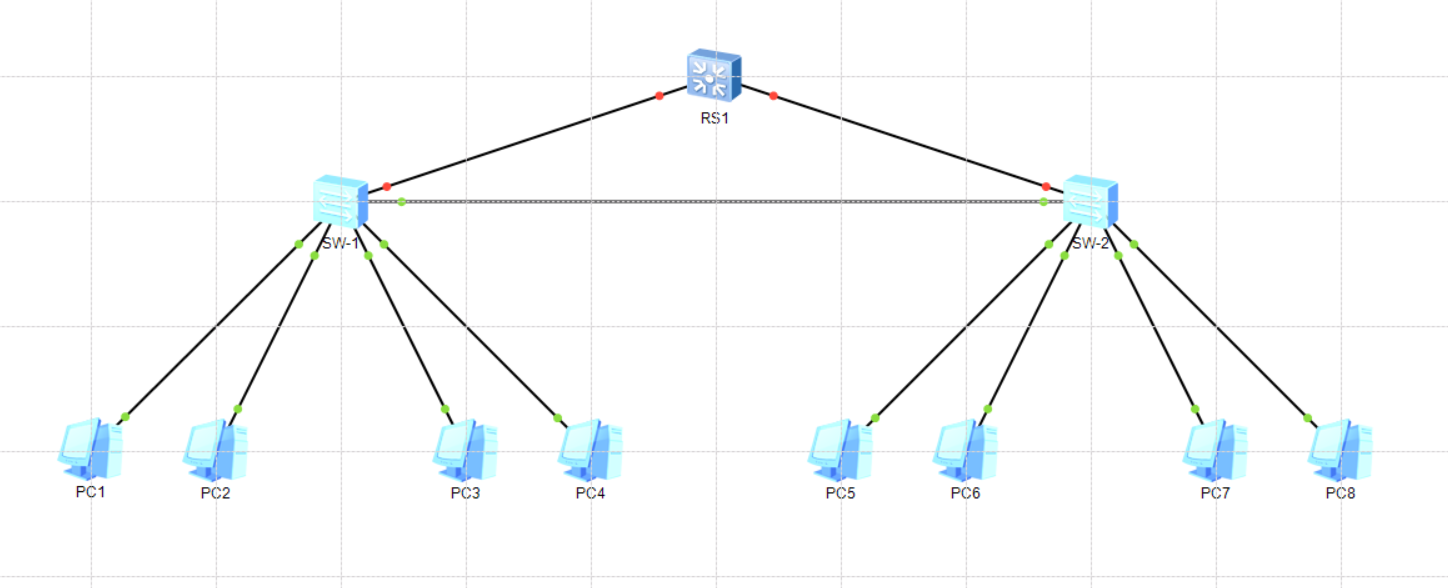
不同VLAN间通信
二层交换机规划
序号
设备名称
接口
VLAN ID
对接设备/端口
1
SW-1
Ethernet 0/0/1
10
PC1
2
SW-1
Ethernet 0/0/2
10
PC2
3
SW-1
Ethernet 0/0/5
20
PC3
4
SW-1
Ethernet 0/0/6
20
PC4
5
SW-2
Ethernet 0/0/1
10
PC1
6
SW-2
Ethernet 0/0/2
10
PC2
7
SW-2
Ethernet 0/0/5
20
PC3
8
SW-2
Ethernet 0/0/6
20
PC4
9
SW-1
GE 0/0/2
1、10、20
SW-2
10
SW-2
GE 0/0/2
1、10、20
SW-1
11
RS-1
GE 0/0/1
1、10、20
SW-1
12
RS-1
GE 0/0/2
1、10、20
SW-2
主机IP地址规划表
序号
设备
IP地址/子网掩码
VLAN ID
接入交换机
1
PC1
192. 168. 24. 11/24
10
SW-1 0/0/1
2
PC2
192. 168. 24. 12/24
10
SW-1 0/0/2
3
PC3
192. 168. 25. 21/24
20
SW-1 0/0/5
4
PC4
192. 168. 25. 22/24
20
SW-1 0/0/6
5
PC1
192. 168. 24. 13/24
10
SW-2 0/0/1
6
PC2
192. 168. 24. 14/24
10
SW-2 0/0/2
7
PC3
192. 168. 25. 23/24
20
SW-2 0/0/5
8
PC4
192. 168. 25. 24/24
20
SW-2 0/0/6
# 配置二层交换机端口
<SW-1>system-view
Enter system view, return user view with Ctrl+Z.
[SW-1]interface GigabitEthernet 0/0/2
[SW-1-GigabitEthernet0/0/2]port link-type trunk
[SW-1-GigabitEthernet0/0/2]port trunk allow-pass vlan 10 20
[SW-1-GigabitEthernet0/0/2]quit
[SW-1]quit
# 显示端口属性,
<SW-1>display port vlan
Port                    Link Type    PVID  Trunk VLAN List
-------------------------------------------------------------------------------
Ethernet0/0/1           access       10    -
Ethernet0/0/2           access       10    -

Ethernet0/0/5           access       20    -
Ethernet0/0/6           access       20    -

GigabitEthernet0/0/1    trunk        1     1 10 20
GigabitEthernet0/0/2    trunk        1     1 10 20

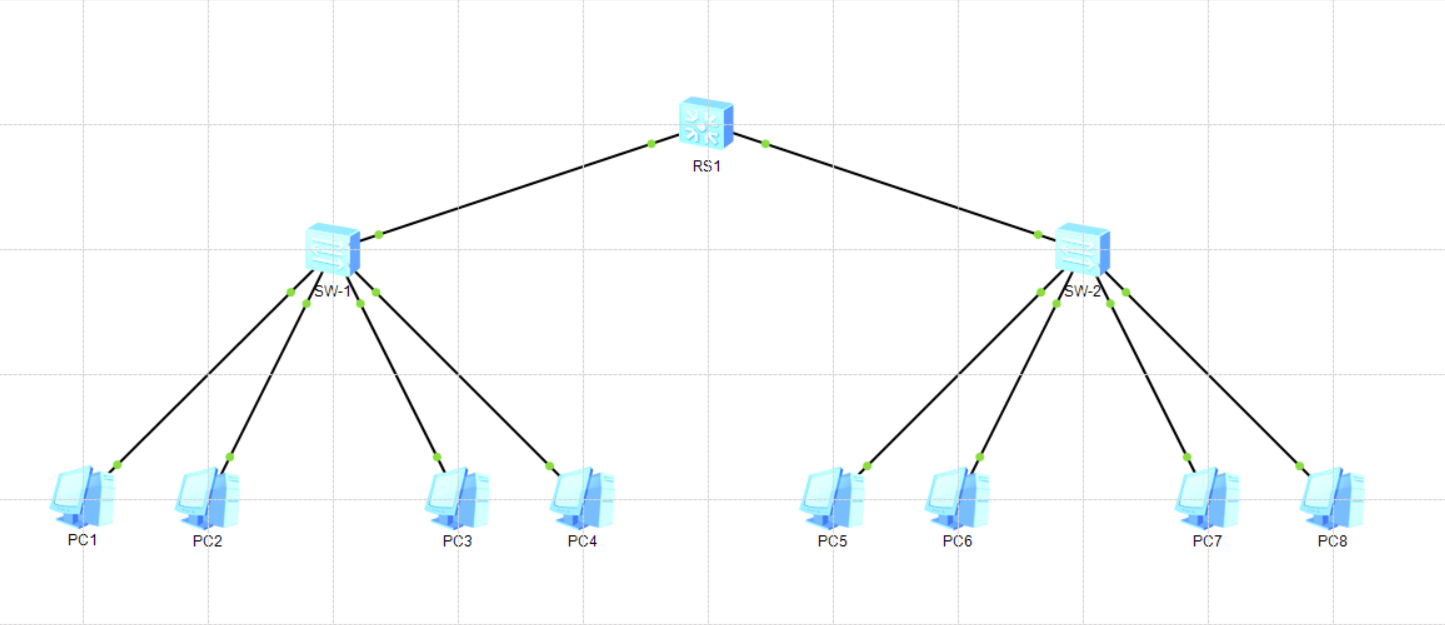
# 配置三层交换机
# 初始化
[Huawei]sysname RS-1
[RS-1]
[RS-1]interface GigabitEthernet0/0/1
[RS-1-GigabitEthernet0/0/1]undo negotiation auto
[RS-1-GigabitEthernet0/0/1]duplex full
[RS-1-GigabitEthernet0/0/1]speed 1000
[RS-1-GigabitEthernet0/0/1]flow-control
[RS-1-GigabitEthernet0/0/1]display this
#
interface GigabitEthernet0/0/1
 undo negotiation auto
 flow-control
#
return
[RS-1-GigabitEthernet0/0/1]description To_SW1
[RS-1-GigabitEthernet0/0/1]quit
[RS-1]
[RS-1]interface GigabitEthernet0/0/2
[RS-1-GigabitEthernet0/0/2]undo negotiation auto
[RS-1-GigabitEthernet0/0/2]duplex full
[RS-1-GigabitEthernet0/0/2]speed 1000
[RS-1-GigabitEthernet0/0/2]flow-control
[RS-1-GigabitEthernet0/0/2]display this
#
interface GigabitEthernet0/0/2
 undo negotiation auto
 flow-control
 description To_SW2
#
return
[RS-1-GigabitEthernet0/0/2]description To_SW2
[RS-1-GigabitEthernet0/0/2]quit
# 创建VLAN
[RS-1]vlan batch 10 20
Info: This operation may take a few seconds. Please wait for a moment... done.
# 分配接口
[RS-1]interface GigabitEthernet 0/0/1
[RS-1-GigabitEthernet0/0/1]port link-type trunk
[RS-1-GigabitEthernet0/0/1]port trunk all
[RS-1-GigabitEthernet0/0/1]port trunk allow-pass vlan 10 20
[RS-1-GigabitEthernet0/0/1]quit
[RS-1]interface GigabitEthernet 0/0/2
[RS-1-GigabitEthernet0/0/2]port link-type trunk
[RS-1-GigabitEthernet0/0/2]port trunk allow-pass vlan 10 20
[RS-1-GigabitEthernet0/0/2]quit
# 显示VLAN
[RS-1]display vlan
The total number of vlans is : 3
--------------------------------------------------------------------------------
VID  Status  Property      MAC-LRN Statistics Description
--------------------------------------------------------------------------------
1    enable  default       enable  disable    VLAN 0001
10   enable  default       enable  disable    VLAN 0010
20   enable  default       enable  disable    VLAN 0020
# 显示接口
[RS-1]display port vlan
Port                    Link Type    PVID  Trunk VLAN List
-------------------------------------------------------------------------------
GigabitEthernet0/0/1    trunk        1     1 10 20
GigabitEthernet0/0/2    trunk        1     1 10 20

# 配置三层路由
[RS-1]interface vlanif 10
[RS-1-Vlanif10]ip address 192. 168. 24. 254 255. 255. 255. 0
[RS-1-Vlanif10]quit
[RS-1]interface vlanif 20
[RS-1-Vlanif20]ip address 192. 168. 25. 254 255. 255. 255. 0
[RS-1-Vlanif20]quit

# 显示路由表
[RS-1]dis ip routing-table
Route Flags: R - relay, D - download to fib
------------------------------------------------------------------------------
Routing Tables: Public
         Destinations : 6        Routes : 6

Destination/Mask    Proto   Pre  Cost      Flags NextHop         Interface

      127. 0. 0. 0/8   Direct  0    0           D   127. 0. 0. 1       InLoopBack0
      127. 0. 0. 1/32  Direct  0    0           D   127. 0. 0. 1       InLoopBack0
   192. 168. 24. 0/24  Direct  0    0           D   192. 168. 24. 254  Vlanif10
 192. 168. 24. 254/32  Direct  0    0           D   127. 0. 0. 1       Vlanif10
   192. 168. 25. 0/24  Direct  0    0           D   192. 168. 25. 254  Vlanif20
 192. 168. 25. 254/32  Direct  0    0           D   127. 0. 0. 1       Vlanif20
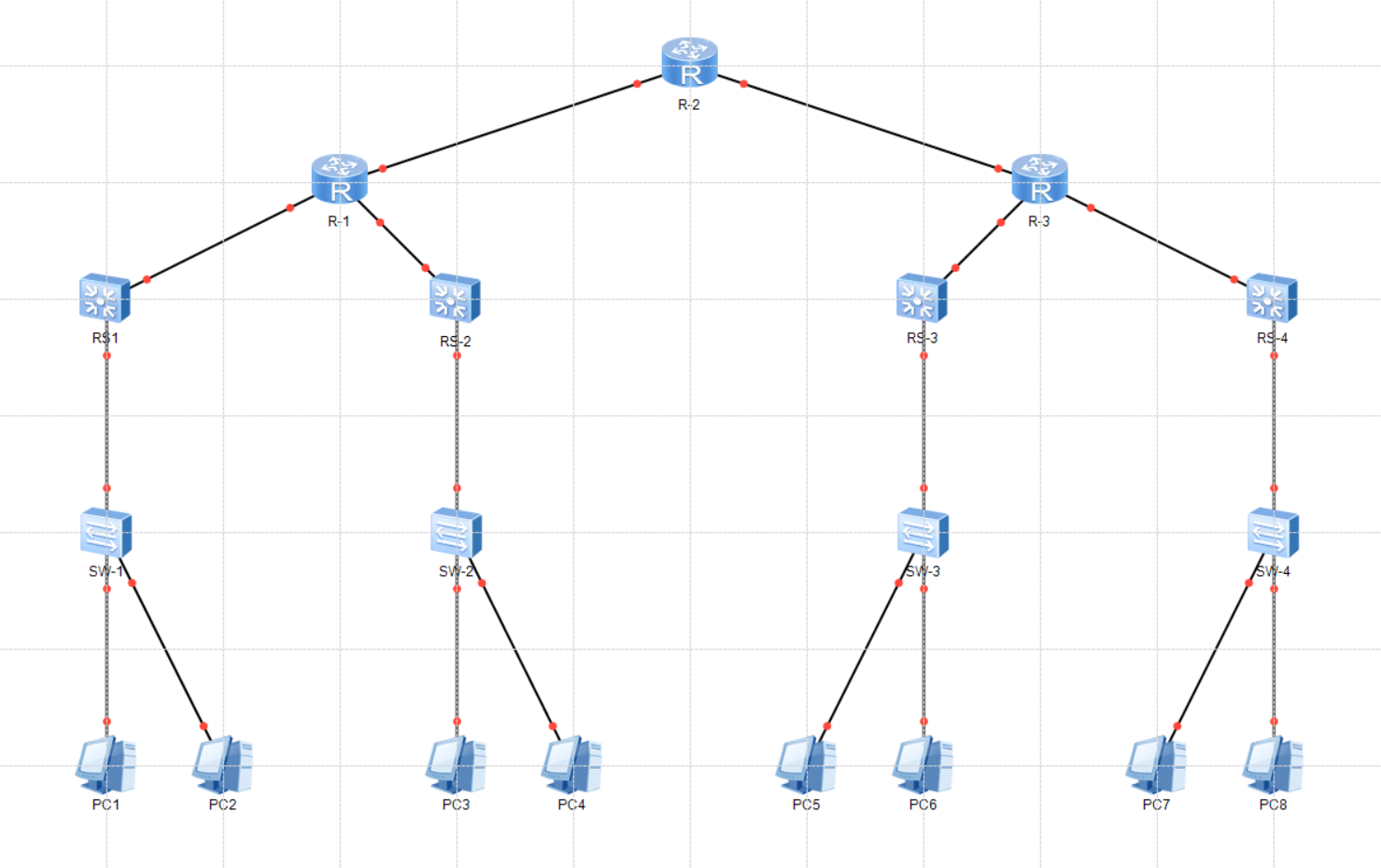
# 主机测试
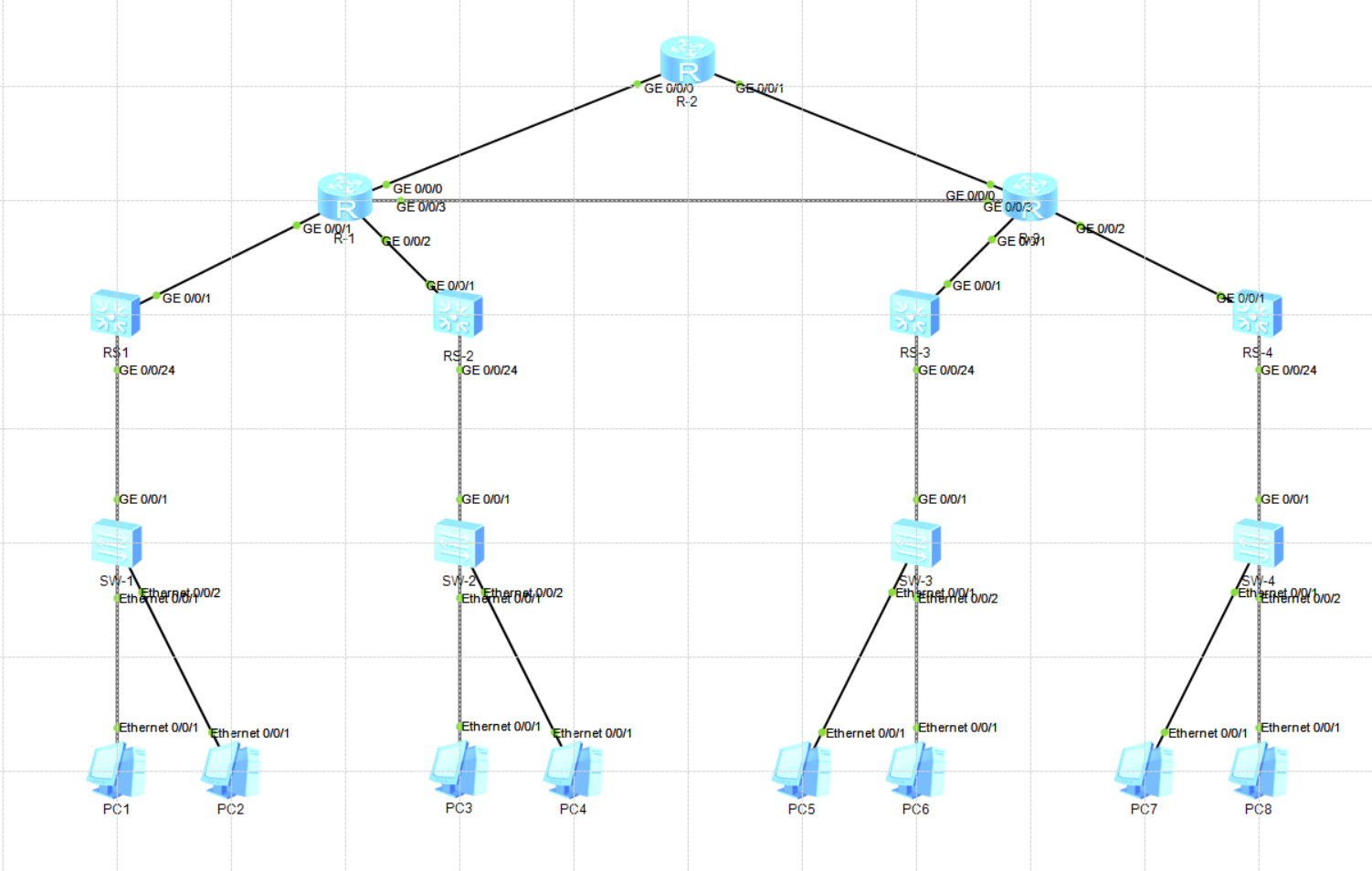
# 从PC1上查看路由经过 PC>tracert 192. 168. 27. 1 traceroute to 192. 168. 27. 1, 8 hops max ( ICMP ), press Ctrl+C to stop 1 192. 168. 20. 254 47 ms 47 ms 47 ms 2 10. 0. 1. 2 78 ms 62 ms 78 ms 3 10. 0. 0. 2 110 ms 78 ms 125 ms 4 10. 0. 0. 6 109 ms 125 ms 125 ms 5 10. 0. 4. 1 156 ms 141 ms 156 ms 6 192. 168. 27. 1 219 ms 156 ms 157 ms
使用RIP
认识RIP
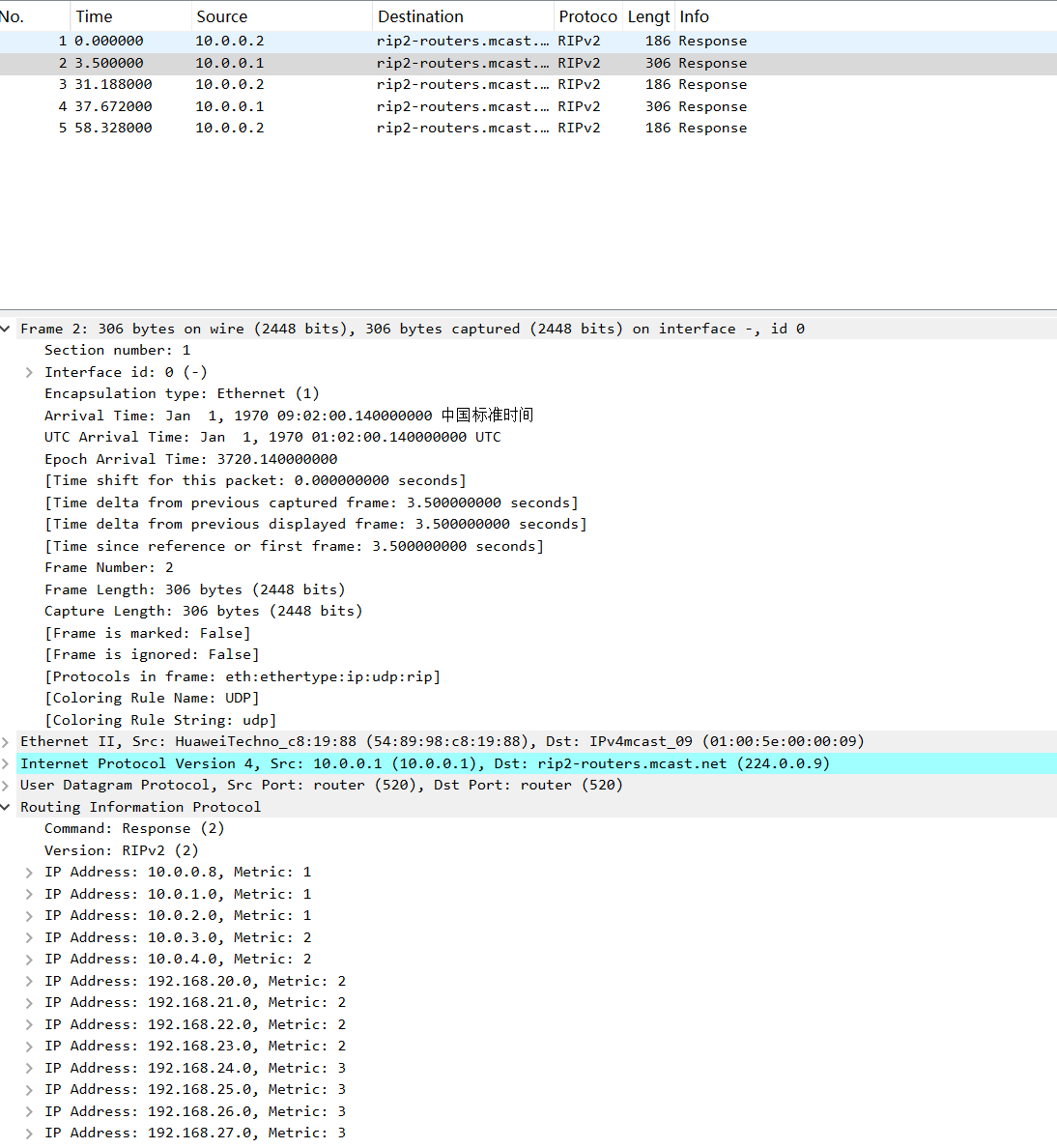
RIP( Routing Information Protocol )路由信息协议,是一种基于距离矢量算法的协议,它使用跳数(HopCount)作为度量衡值来衡量到达目的地址的距离。
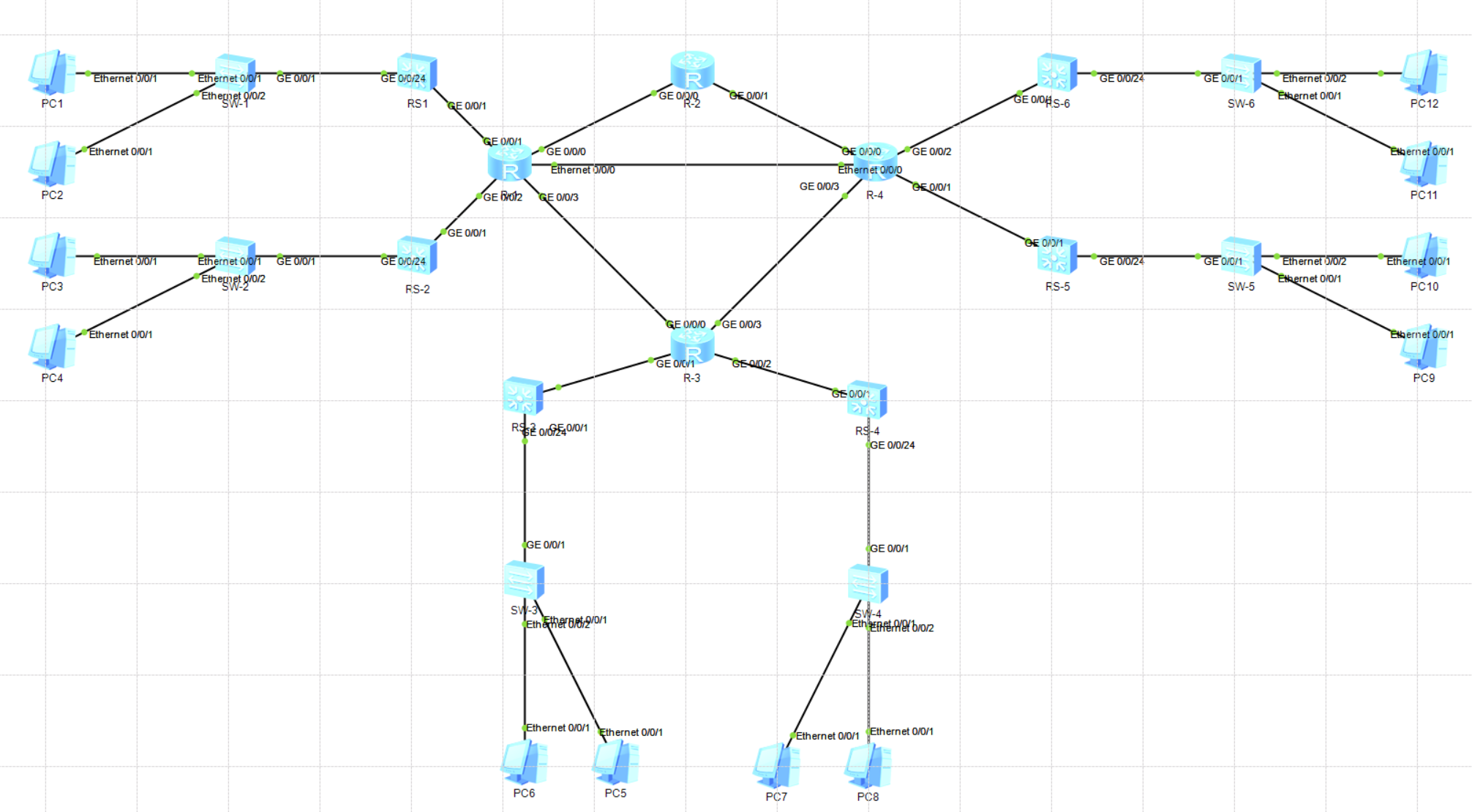
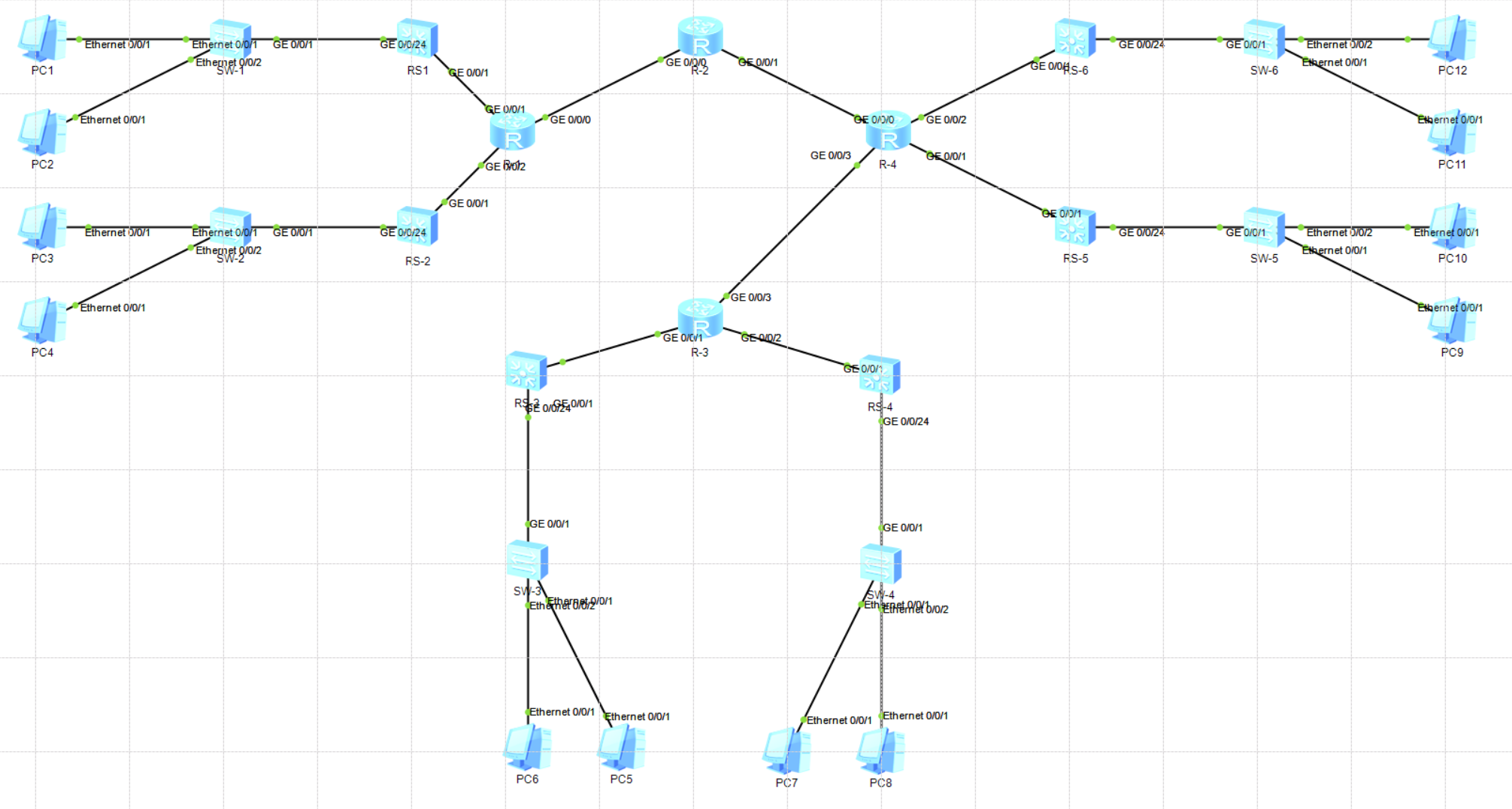
traceroute to 192. 168. 27. 1, 8 hops max ( ICMP ), press Ctrl+C to stop 1 192. 168. 20. 254 47 ms 47 ms 46 ms 2 10. 0. 1. 2 110 ms 62 ms 94 ms 3 10. 0. 0. 10 141 ms 109 ms 109 ms 4 10. 0. 4. 1 719 ms 110 ms 140 ms 5 192. 168. 27. 1 219 ms 203 ms 203 ms # 相比静态路由减少一跳 # 断开10. 0. 0. 9到10. 0. 0. 10之间的链路,可以发现路由动态修改 PC>tracert 192. 168. 27. 1
traceroute to 192. 168. 27. 1, 8 hops max ( ICMP ), press Ctrl+C to stop 1 192. 168. 20. 254 63 ms 47 ms 47 ms 2 10. 0. 1. 2 62 ms 63 ms 47 ms 3 10. 0. 0. 2 125 ms 93 ms 94 ms 4 10. 0. 0. 6 172 ms 109 ms 110 ms 5 10. 0. 4. 1 125 ms 156 ms 172 ms 6 *192. 168. 27. 1 204 ms 187 ms
traceroute to 192. 168. 27. 1, 8 hops max ( ICMP ), press Ctrl+C to stop 1 192. 168. 20. 254 47 ms 63 ms 47 ms 2 10. 0. 1. 2 78 ms 78 ms 78 ms 3 10. 0. 0. 13 94 ms 109 ms 94 ms 4 10. 0. 4. 1 125 ms 109 ms 110 ms 5 *192. 168. 27. 1 156 ms 141 ms
traceroute to 192. 168. 27. 1, 8 hops max ( ICMP ), press Ctrl+C to stop 1 192. 168. 20. 254 47 ms 46 ms 32 ms 2 10. 0. 1. 2 78 ms 62 ms 63 ms 3 10. 0. 0. 2 78 ms 94 ms 78 ms 4 10. 0. 0. 6 109 ms 125 ms 110 ms 5 10. 0. 0. 10 125 ms 140 ms 125 ms 6 10. 0. 4. 1 156 ms 157 ms 156 ms 7 *192. 168. 27. 1 203 ms 219 ms