
Linux的网络部署
PXE( (Preboot eXecution Environment )是一种通过网络来实现网络部署操作系统或者网络加载操作系统的技术,主要的流程为:
通过DHCP引导内核或者启动文件
通过Web、SMB或者FTP共享文件下载系统安装文件;
3。 通过KS文件实现无人值守,自动设置、自动装机。
其基本思路和网络流量走向如下图:

DHCP
安装dhcp server |
引导环境
安装必备软件 |
添加系统
复制安装ISO镜像 |
UEFI配置
配置UEFI主机 |
自动部署
cd ~ |
 微信
微信

相关推荐

2025-02-21
Linux中的文件、硬链接和软连接
我一直对自己对 Linux 中的 inode、硬链接和软链接的肤浅理解感到困扰。在这里,我尝试将我的学习结构化为一个简化的思维模型。欢迎指正。 下文是对A mental model for Linux file, hard and soft links的翻译 Linux中的文件、硬链接和软连接Linux中文件是什么?在存储层面,文件是数据块。在文件系统级别,此数据块表示为称为inode的抽象。将 inode 视为存储有关底层数据块的元数据的数据结构。路径名 使得这一对(inode,数据块)可供人类访问和使用。 以这种方式思考整体 - 文件的数据块位于比路径名(位于文件系统级别)更低的抽象级别。inode 充当桥梁 - 文件系统级别的数据块的代表。 文件的组成部分。从下往上依次为数据块、inode 和路径名 大致来说,文件 = 路径名 + inode + 数据块。 因此,当您谈论文件时,您可能指的是其中部分或全部组件。 硬链接现在,如果我们将路径名视为贴在(inode,数据块)对上的标签,那么我们可以用不同的标签引用同一个 inode。 两个路径名/tmp/fi...

2021-05-08
制作CentOS8的黄金模板
前期准备 在虚拟化环境中部署CentOS8-Stream,包含Hyper-V、Esxi、Virtualbox等; 使用mini组件部署,大约会安装378个软件包; 安装过程中添加简体中文支持、设定时区为上海、使用硬盘自动分区、关闭kdump; 设定root密码( 后期关闭root的ssh访问权限 ),并添加远程ssh访问管理员账户; 设定网络开机自动启动; 系统调整 安装工具 # 安装更新dnf makecachednf upgrade -y# 安装系统工具dnf install -y wget curl zip unzip vim mailx mlocate telnet net-tools bash-completion tmuxdnf install -y chrony rsync iotop git screen tree open-vm-tools yum-utilsupdatedb && ldconfig# 配置默认主机名hostnamectl set-hostname vlnx000000# 配置模板机网络别名为eth0, 如果是Hyper-V的...
2021-07-05
终端安全系统WAZUH的介绍
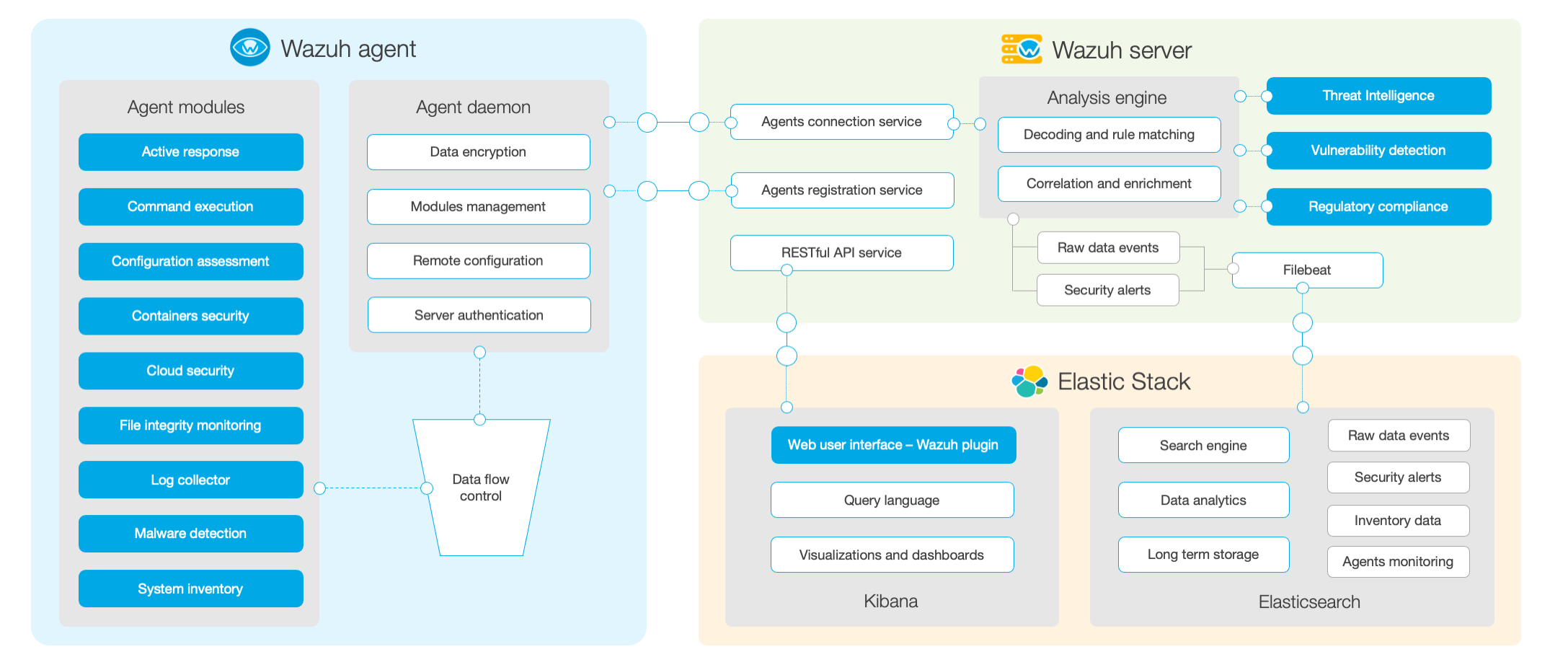
简介[Wazuh]( Wazuh · The Open Source Security Platform)是一整套基于ossec安全检测工具和EFK日志工具构成的终端安全管理工具。不管是将其分类至HIDS,还是EDR,它都是一套通过监控主机日志行为,提供安全检测、分析和完整报告的开源、免费利器。Wazuh基于C/S架构,它的Agent支持Windows、MacOS、Linux、HP-UX、AIX等主流操作系统。其服务端负责提供认证和数据收集,然后通过filebeat进行日志清洗,最后导入ElasticSearch,通过Kinbana进行展示和输出日志。它不仅可以收集主机的事件日志进行一般的入侵检测功能,还可以通过第三方提供的系统漏洞检测feed文件,来实现主机的漏洞扫描和合规检查。 功能示例 组件模块Wazuh的组件分为三部分: 客户端的功能 收集日志和事件日志; 文件和注册表的监控; 运行进程和安装软件的信息收集; 监控系统端口和网络配置; 检测恶意软件; 配置管理和策略监控 检测主机响应 服务端 客户端的服务器注册; 实现客户端的连接服务; 根据各项...

2025-01-14
Prometheus使用初步
概述Prometheus是新一代监控系统解决方案,可以和Kubernetes无缝对接,是容器监控的不二之选,其功能组件有: Prometheus Server,主程序,同时也是一个时序数据库 AlertManager,告警组件 Pushgateway 中间网管组件 Data visualization and export 数据展示组件 Service discovery 服务发现组件 部署Server# promtheus server 的部署podman pull prom/prometheus:v. 3. 1. 0mkdir ~/prometheus# 创建配置文件cat > ~/prometheus/prometheus.yml <<EOFglobal: scrape_interval: 15s scrape_timeout: 10s evaluation_interval: 15s alerting: alertmanagers: - follow_redirects: true scheme: http timeout...

2021-08-01
Wazuh系统的群集化改造
综述在中大型网络环境中,单台Allinone的Wazuh系统或者单节点的分布式部署Wazuh系统从性能上已经无法满足日志分析和漏洞扫描的需求,因此应当采用高可用、多节点的分布式部署来满足Wazuh对CPU和存储的要求。 序号 系统描述 配置 网络地址 系统角色 1 Lvsnode1 1c/1g 192. 168. 79. 51 LVS+KeepLived 提供VIP和负载均衡 2 Lvsnode2 1c/1g 192. 168. 79. 52 LVS+KeepLived 提供VIP和负载均衡 3 Wazuhnode0 2c/2g 192. 168. 79. 60 Wazuh主节点,提供认证以及cve库 4 Wazuhnode1 1c/1g 192. 168. 79. 61 WazuhWorker,工作节点,提供事件日志分析和漏洞扫描 5 Wazuhnode2 1c/1g 192. 168. 79. 62 WazuhWorker,工作节点,提供事件日志分析和漏洞扫描 6 KibanaNode 2c&#...