
非Windows平台使用发票验真平台
同事在Mac平台或者其他非Windows主机使用《国家税务总局全国增值税发票查验平台》的时候候会出现使用问题,导致无法进行发票验真操作。其实,这是一个很容易解决的小问题。
- 06 西安·喜来登酒店·1212
故障表现
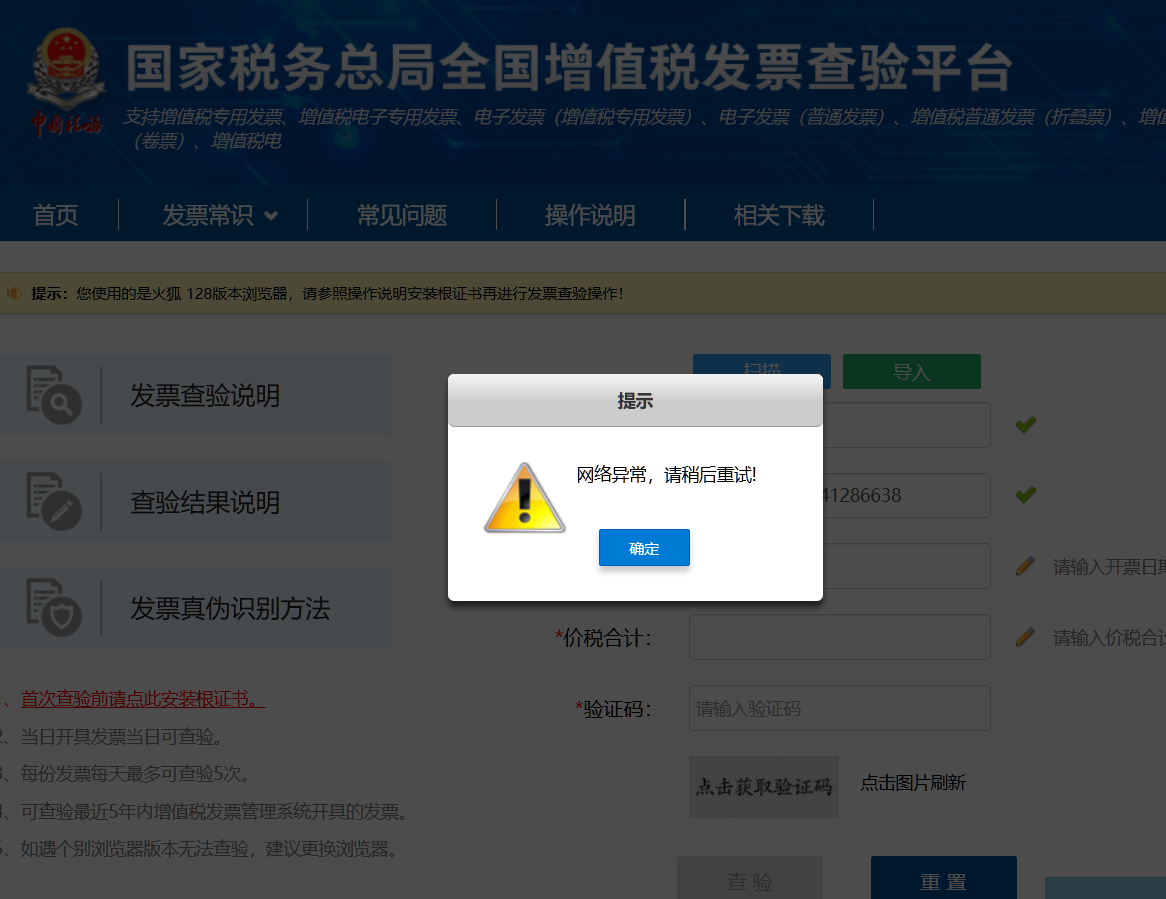
登录国家税务总局全国增值税发票查验平台,之后发现证书是国家税务总局自签的证书,而且是从2015年到2036年的十年证书。除此之外,页面还有弹窗错误,这是由验证码功能无法正确连接后台导致的。
官方处理
官方的处理方式就是通过根证书安装引导界面来下载和部署安装国税总局的根证书和自签证书。但这种方式主要针对Windows平台,对于其他非Windows平台没有给出解决方案。
解决思路
原始文件
我们来拆解官方证书安装工具。将taxca.rar这个压缩包解压之后,可得到名为“一键安装. exe”的部署工具。然后继续解压缩就可以得到安装脚本和证书本体。其中证书分为两种,一种是p7b文件,另一种是两个cer文件。
目录: C:\Users\root\Downloads\taxca |
安装脚本
这个脚本是十年前写的,是针对Windows XP环境的工具,我们可以从中看到p7b文件和cer文件其实是等价的。
@echo off |
由于chrome并不支持导入p7b文件,所以我们导入两个cer文件即可解决问题。
P7B 文件是一个安全证书文件,其中包含用于验证个人或设备的安全数字证书。与 . cer 证书文件类似,可以使用“安装证书”选项通过文件上的右键单击选项来安装 P7B 文件。 P7B 使用与 CER 文件格式不同的格式选项。它包含一个或多个使用 base64 ( ASCII ) 编码的 X. 509 数字证书文件。 P7B 文件作为 ZIP 文件接收或从证书颁发机构接收。
解决问题
- 寻找设置页面
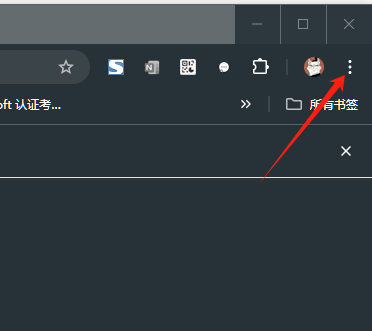
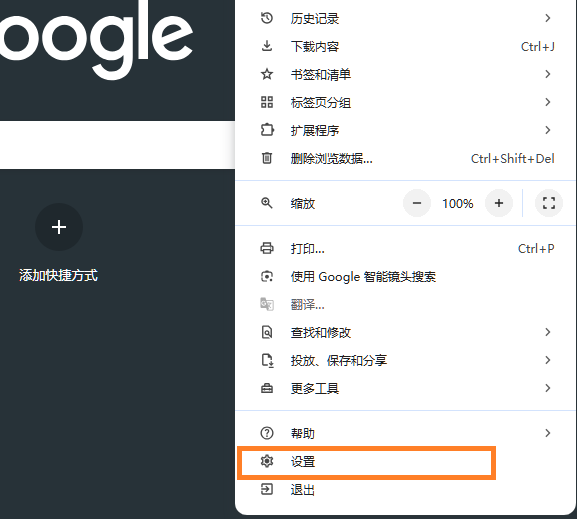
- 打开设置
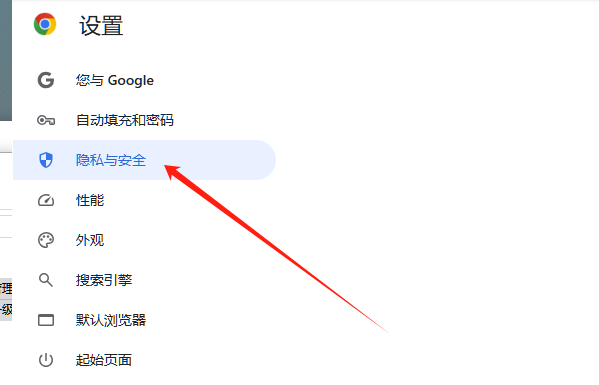
- 选择“隐私与安全”
- 选择 “安全” 页面
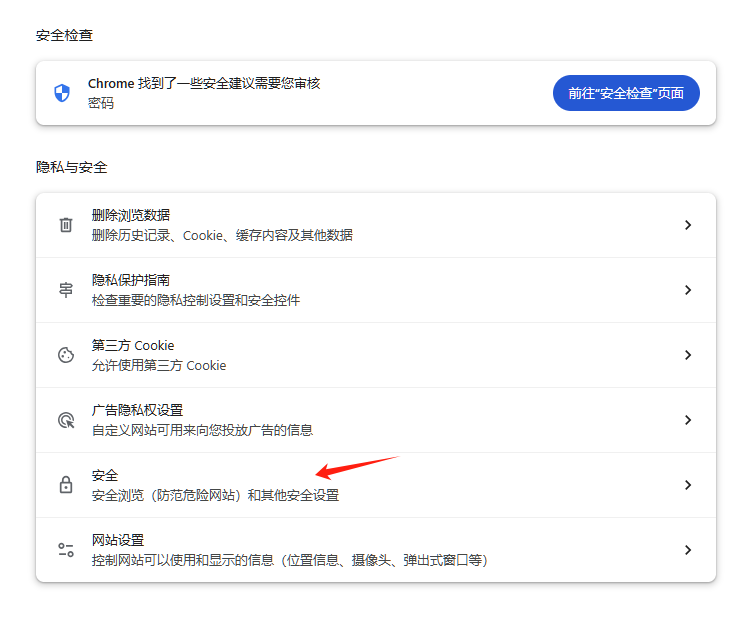
- 选择“管理证书”
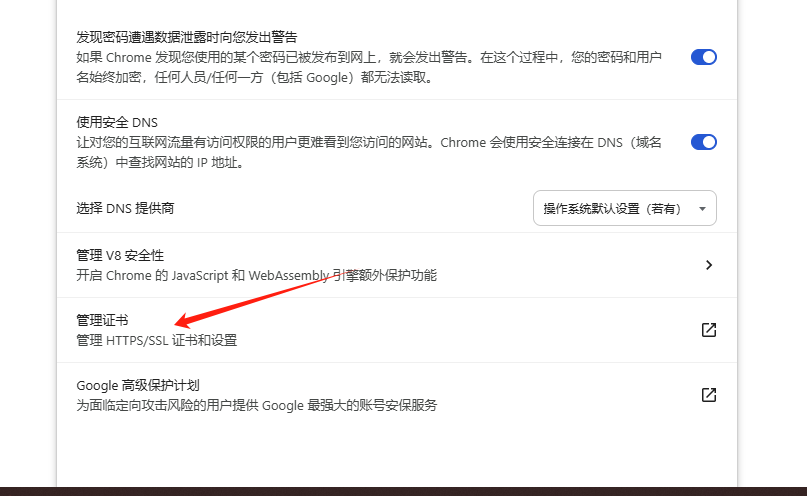
- 选择 “由您安装” 自定义证书
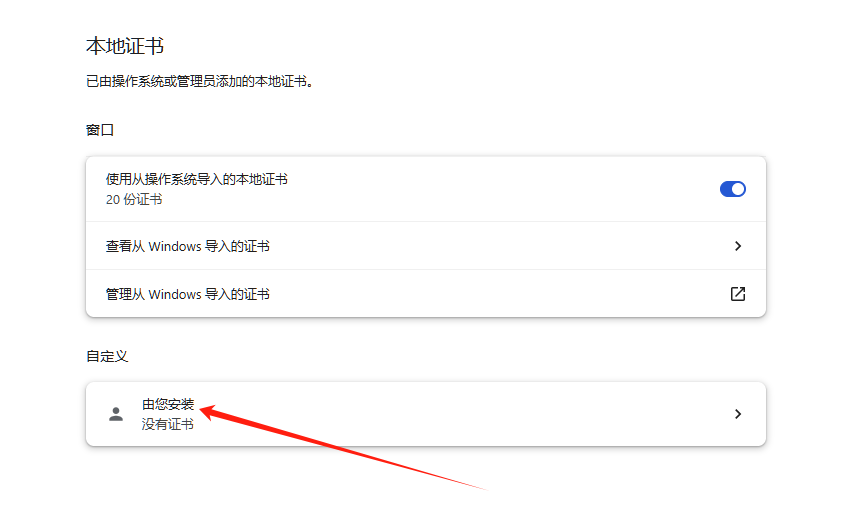
7. 导入 自定义证书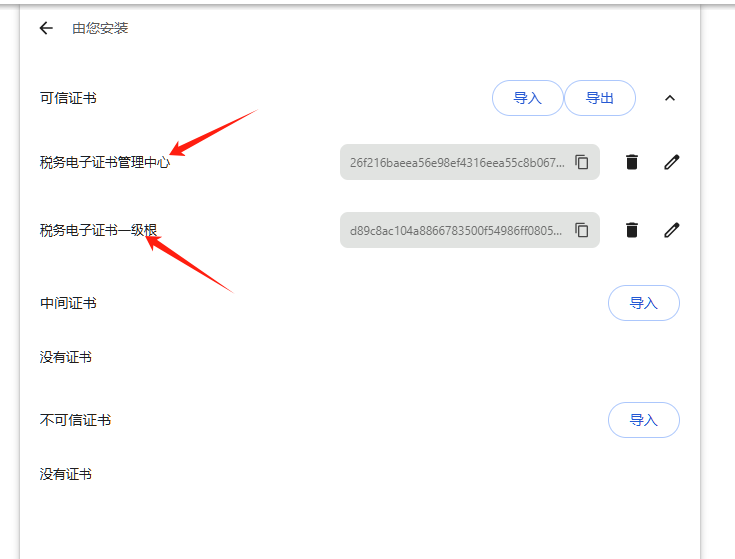
- 检查结果
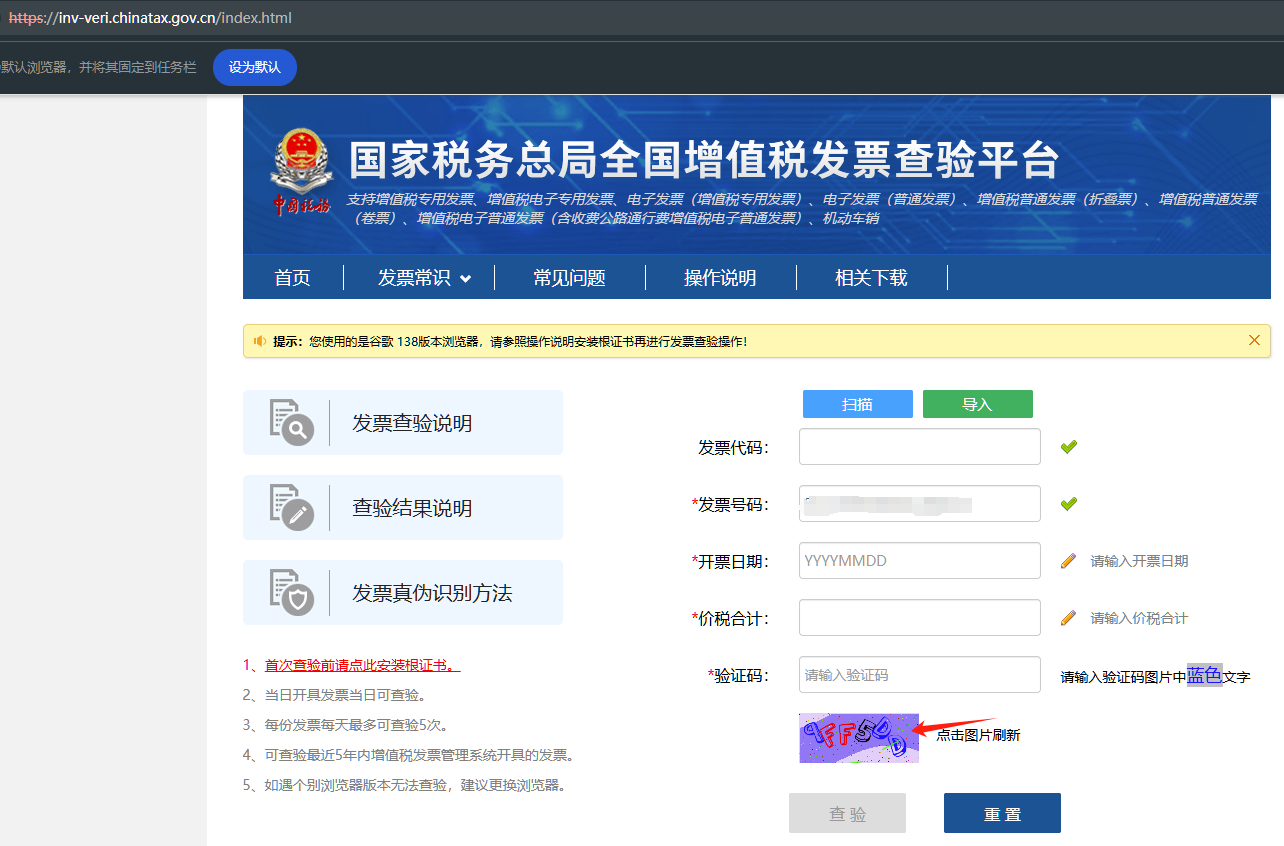
打完收工,现在虽然还有SSL证书的错误提示,但已经可以正常查验发票了。
 微信
微信

相关推荐
2023-10-21
全网SSL证书的自动更新
在运维实践中,SSL证书的维护也是值得重视的运维工作,特别是现在的普通商业SSL证书都变成2年期和1年期了。这里就需要专门抽时间来进行证书有效期监控和对各种CDN、云服务商、ECS进行证书更新维护。ohttps就是专门提供这个服务的saas服务商,这里有完整的介绍。 原理 使用certbot类似方案申请 **Let’s Encrypt**的域名证书 该网站集成了多个云服务商的SDK,通过对应API来修改dns记录、添加托管SSL证书 通过调用API来实现证书的自动更新 使用授权 获取阿里云、七牛等云服务商的 Access Key ID和Sercret 对RAM账号进行授权,这里很多需要Fullaccess权限,需要注意 添加管理节点 自动更新会在凌晨1点进行 问题 很多公有云不支持,比如AWS、AZURE等; 支付需要调用第三方平台打开较慢,且不知道哪里开发票 费用1。 一个通配符证书,使用阿里云的CDN和OSS、SSL,再加上监控服务,一年差不多是5块钱。2。 开通账号赠送5元体验金,基本上第一年免费了。3. 使用我的邀请链接注册,你我都将额外多获得1元...

2025-11-02
使用UPtime-Kuma来监控站点和SSL证书
Uptime Kuma 是一款轻量级自动化运维监控工具,支持监控 HTTP( s )、TCP、Ping、DNS 记录、推送以及 Steam 游戏服务器的正常运行时间。对于检查特定关键词是否存在于网页中等轻量级监控是足够了。相对于Zabbix,它的设置更为简单,非常适合用于网页监测服务。 10 山西省临汾市洪洞县·广胜寺 安装Docker# 系统使用Rockylinux 10# 卸载Podmandnf remove -y podman*dnf install -y yum-utils device-mapper-persistent-data lvm2 jq# 官方安装案例# curl -fsSL https://get.docker.com -o get-docker.sh# sh ./get-docker.sh --dry-run# 添加软件源信息dnf config-manager --add-repo https://mirrors.aliyun.com/docker-ce/linux/centos/docker-ce.reposed -i 's+d...

2023-09-23
快速构建实验环境的基础服务
在单机试验环境中,经常需要配置DNS解析、生成SSL证书、保存或者拉取配置脚本,这些操作往往散布到各个节点的实际操作中,较为繁琐且容易出错,所以创建一个虚机镜像来提供统一的服务就是有需求的。以下就是通过在VM上部署实现相关功能的操作实践。 类别 内容 功能 基础架构服务 主机名 infra.contoso.com IP 192. 168. 10. 254 配置 2core 2G mem 40GB disk 承载服务 DNS以及DNS缓存、时间服务、SSL证书生成和下载、git服务、导航页、Ansible控制台、主机管理 包管理安装主机准备基础环境准备主机环境的准备执行准备:RockyLinux9的主机部署 # 系统更新dnf makecachednf update -y# 由于主机模板只给了20G硬盘,所以需要扩容dnf install cloud-utils-growpart-0. 33-1. el9. x86_64growpart /dev/sda 2lvextend -l +100%free /dev/rl/rootxfs_growfs /...

2025-11-15
使用ohttps持续部署SSl证书
11 天津 天塔 我虽然一直使用ohttps来提供免费证书的定时更新和CDN、SLB之类云服务的证书更新,但对于ECS服务器的SSL更新一直是手动来执行。随着管理站点的增加,现在更新一次证书需要在七八台机器上折腾,虽然三个月搞一次,但还是下决心使用推送的方式来解决这个问题。 准备域名 ohttps站点的管理后台 添加免费泛域名证书 设置目标域名的证书认证解析 添加CNAME域名 认证成功后就会自动申请一个泛域名证书 准备管理账户 接下来就需要在服务器上添加一个管理SSL证书和Nginx的账户 #!/bin/bash## Script: setup_cert_user.sh# Description: Create user 'cert' with SSH key-only login, sudo for nginx service,# and write access to /etc/nginx/ssl.# Usage: sudo ./setup_cert_user.sh# Author: Linux Ad...